
Kimi K3.1 Pro in LocModel: What the SSD Demo Shows
guideUpdated 14 min read
LocModel's Kimi SSD demo ran at one token every ten seconds, and the file was most likely Kimi K3. What it shows, what K3.1 Pro needs and the API setup.
Last verified: 5 November 2026, 15:45 UTC. We reviewed Zero Degree's video and the public pages of Moonshot AI, Unsloth, Hugging Face and LocModel. We did not run the model.
By Frankie C. · Senior Market Researcher, Mindber. Tracks 500+ AI/SaaS tools across SEA markets via the Mindber Innovation Index methodology.
In Zero Degree's LocModel demo, a model loaded from a 1 TB SSD took about ten seconds to produce each token. A short introduction took minutes. In a separate run, the presenter switched LocModel to Moonshot's API and used Kimi K3.1 Pro to build a 3D shooter.
The local download appears to have been the earlier Kimi K3. Its 14 files and reported size match Unsloth's 1-bit K3 release. We couldn't inspect the original download, and our 5 November search found no K3.1 Pro GGUF, the file format LocModel loads, on Hugging Face or ModelScope.
For interactive work in LocModel, we'd start with the API. The demo shows how slow SSD offloading is for a model this large, but the exact speed of K3.1 Pro on that PC remains unknown.
Which model the SSD demo loaded
The video calls its download Kimi K3.1 Pro, and we couldn't open the channel's download page to check the file name. Four facts point to Kimi K3, the July model:
- At 15:45 UTC on 5 November, Hugging Face's search returned no GGUF of K3.1 Pro under any name. ModelScope's search returned none either.
- Unsloth's K3.1 Pro repo, created on 4 November, holds the 96 original safetensors files, 1.56 TB in total, and no GGUF.
- Unsloth's Kimi K3 GGUF repo has a 1-bit build (UD-IQ1_S) in exactly 14 files. They total 594.0 GB, which Windows counts in binary units and shows as 553 GB, the "more than 550 GB" in the video.
- K3.1 Pro is not a renamed K3. Moonshot's model card says it replaced K3's 24 full-attention Gated MLA layers with Gated DeepSeek Sparse Attention, and Hugging Face lists it as a new architecture,
kimi_k31.
The two models have similar weight sizes and active parameter counts, so we'd expect SSD bandwidth to be a bottleneck for K3.1 Pro too. The demo measured it on a file that appears to be K3. Everything K3.1 Pro did in the video, it did through the API.
What happened on the SSD, and what happened on the API
The video, posted 5 November at 12:28 UTC, set out to do what many readers asked about the day the weights came out: run the 3T model on an ordinary PC. Zero Degree downloaded the 14 files with a 64-thread download manager. In LocModel, importing the first file chained the other 13 automatically onto a 1 TB SSD. LocModel's site says it spreads a model's attention layers, MoE expert layers and KV cache across GPU, RAM and disk, and reads the disk on demand.
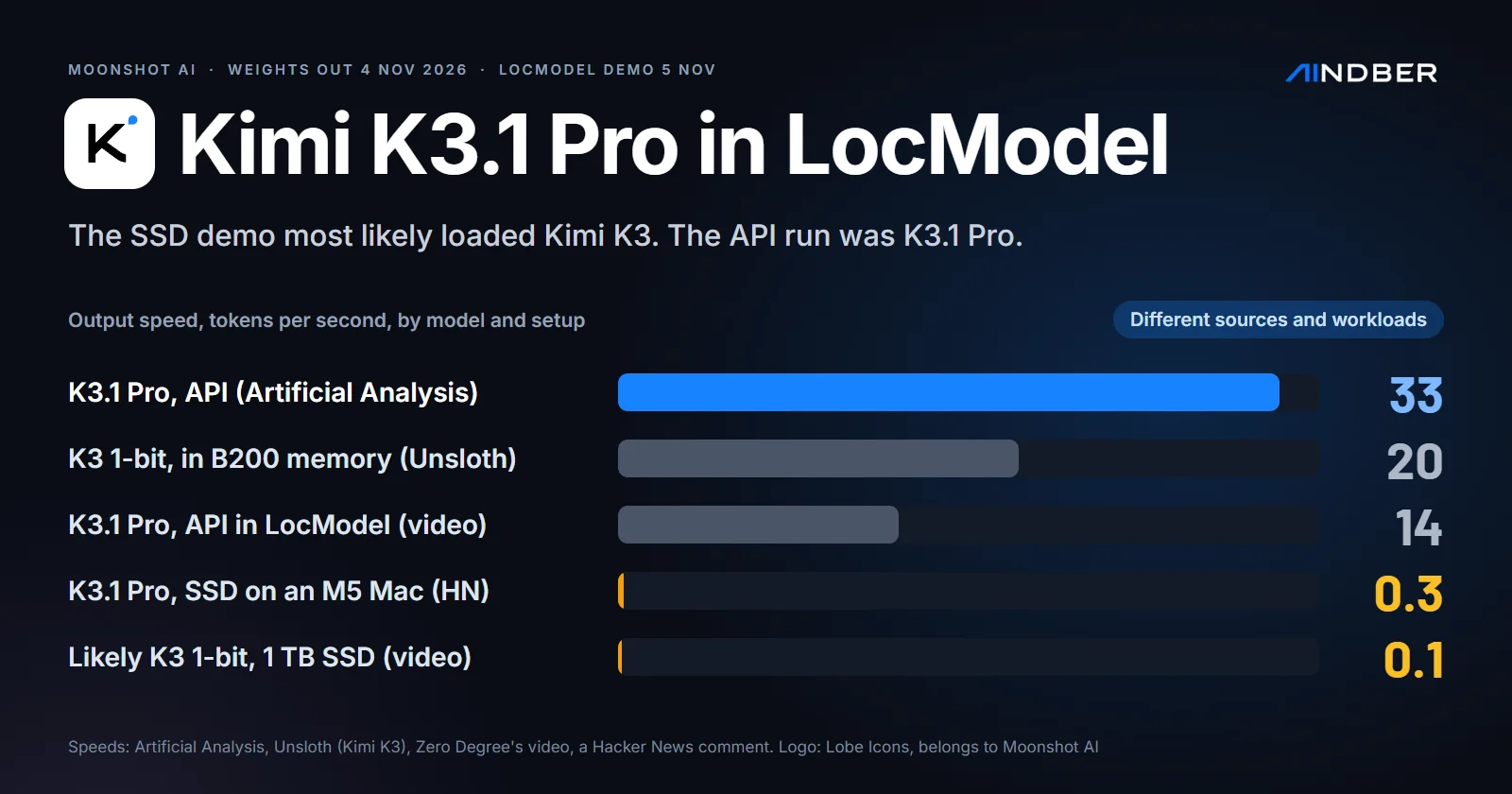
With thinking switched off to save tokens, the presenter waited for loading to reach 100% and asked the model to introduce itself. The reply came out at about 0.1 tokens per second, and "Hello, I'm Kimi, an AI assistant built by Moonshot AI" took minutes. The app didn't crash. It just wasn't usable. Back in the same app with the API selected, output ran above 14 tokens per second.
K3.1 Pro via API
14 tok/s
1-bit file on SSD
0.1 tok/s
0 tok/s4 tok/s8 tok/s12 tok/s16 tok/s
Other published speeds come from different models, machines and workloads, so they belong in a table rather than one ranking:
| Speed | Model | Setup | Source |
|---|---|---|---|
| about 33 tokens/s | Kimi K3.1 Pro | Moonshot's API at max effort, on Artificial Analysis's test tasks | Artificial Analysis |
| about 20 tokens/s | Kimi K3, 1-bit build | The whole file in B200 GPU memory | Unsloth's Kimi K3 guide |
| about 0.3 tokens/s | Kimi K3.1 Pro, full size | Streamed from SSD on a 128 GB M5 MacBook Pro | A Hacker News comment describing a demo |
Why an SSD can't keep up with 104 billion active parameters
A dense model reads all its weights for every token it writes. Kimi K3.1 Pro is a mixture of experts: in each expert layer a router picks 16 of 896 small expert networks for the current token, and two shared experts always run. That's how only 104 billion of the 2.8 trillion parameters work on any one token.
The catch for a home PC is that the next token may pick different experts. The working set keeps moving through the whole file, so a cache in RAM only helps with the experts that happen to repeat.
One calculation shows the size of the problem. Unsloth's 1-bit file packs 2.8 trillion parameters into 594 GB, about 0.21 bytes each. If all 104 billion active weights for a token had to come from the disk, that token would need about 22 GB. Samsung's 9100 Pro, one of the fastest consumer PCIe 5.0 drives, is rated at up to 14,800 MB/s for sequential reads, Tom's Hardware notes. That's one and a half seconds per token at best, and real reads are slower: expert weights sit scattered across the file. Part of the model stays in RAM, which pulls the other way.
At the demo's 0.1 tokens per second, a 2,000-token answer takes about five and a half hours. A faster drive doesn't change the picture. PCIe 5.0 doubles the link speed of PCIe 4.0, so at best it halves the wait.
Hacker News readers worked through the same math within hours of the release. One commenter put the read at about 25 GB per token for the full-size model, all of it routed expert weights. The same comment says a demo on a 128 GB M5 MacBook Pro ran at about 0.3 tokens per second. Those are the commenter's figures, not a benchmark:
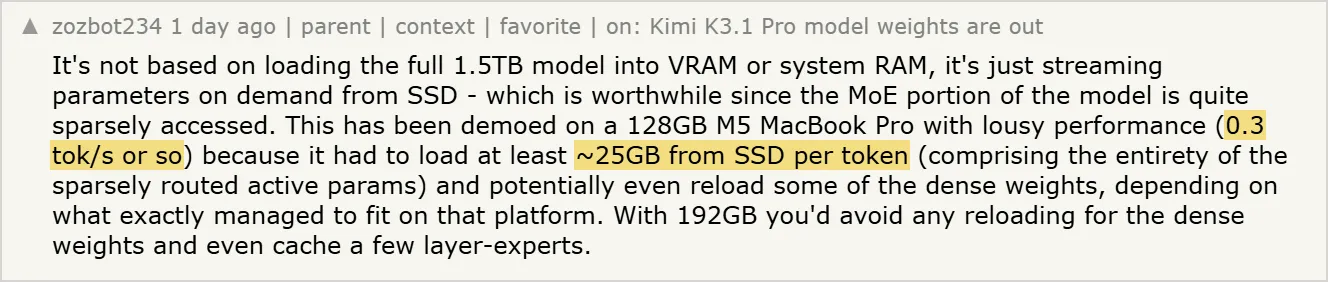
Posted 4 November 2026 at 18:38 UTC in the thread "Kimi K3.1 Pro model weights are out". Source: news.ycombinator.com/item?id=50369725
Further down the thread, another reader set "the border of usefulness" at 7 to 10 tokens per second for an agent you steer by hand. The commenter defending SSD streaming framed it around unattended jobs that run in parallel, with several drives read at once on a workstation.
Unsloth, which publishes the Kimi K3 GGUF builds, states the rule plainly in its guide. RAM plus VRAM should roughly equal the file size. "Otherwise it'll still work, just much slower due to disk offloading."
What it takes to fit the model in memory
Unsloth's 20 tokens per second assumes the whole build fits in GPU memory. Below is what each of its Kimi K3 builds needs in RAM and VRAM combined, next to a gaming PC with 64 GB of RAM and a 24 GB graphics card. K3.1 Pro has no GGUF yet. With the same parameter count, we'd expect its builds to land close to these, but that is an expectation, not a measurement.
Lossless Q8
1600 GB
2-bit XL
880 GB
2-bit XXS
726 GB
1-bit M
665 GB
1-bit S (video size)
610 GB
Gaming PC
88 GB
0 GB425 GB850 GB1275 GB1700 GB
Unsloth also measures each build against the lossless one by how often it picks the same next token:
| Unsloth build (Kimi K3) | Size on disk | Files | Top-1 agreement with the full model |
|---|---|---|---|
| UD-Q1_0 | 466.4 GB | 11 | not published |
| UD-IQ1_S | 594.0 GB | 14 | 78.9% |
| UD-IQ1_M | 648.9 GB | 15 | 81.2% |
| UD-IQ2_XXS | 711.1 GB | 16 | 84.1% |
| UD-Q2_K_XL | 861.3 GB | 19 | 90.4% |
| UD-Q4_K_XL | 1,508.7 GB | 32 | near full precision |
| UD-Q8_K_XL | 1,561.2 GB | 34 | lossless |
File sizes and counts come from the repo's file list on Hugging Face. Agreement figures come from Unsloth's guide.
The 4-bit build is only 3% smaller than the lossless one, because Moonshot trained the expert weights in 4-bit MXFP4 to begin with. You either keep almost all 1.5 TB, or you drop to 1 or 2 bits. At those sizes, between one token in ten and one in five differs from the full model's pick.
Moonshot's own release post, at 16:00 UTC on 4 November, was one line and a link to the repo:
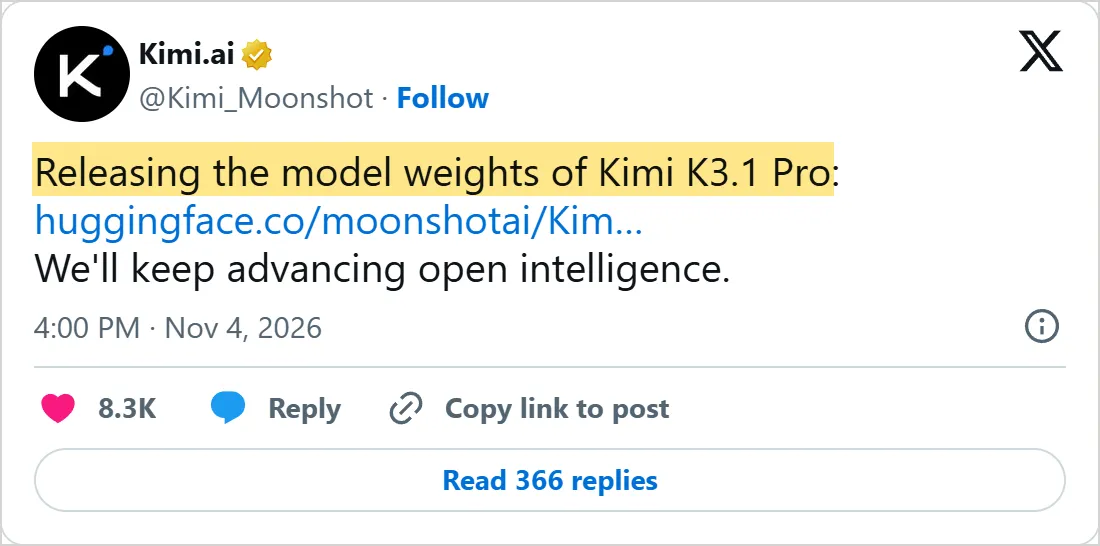
Posted 4 November 2026 at 16:00 UTC by @Kimi_Moonshot. The post's image is hidden. Source: x.com/Kimi_Moonshot/status/2118010528123773297
Running the full weights at home means data-center hardware. Chubby, an AI news account with 156,000 followers on X, priced one setup 27 minutes later:
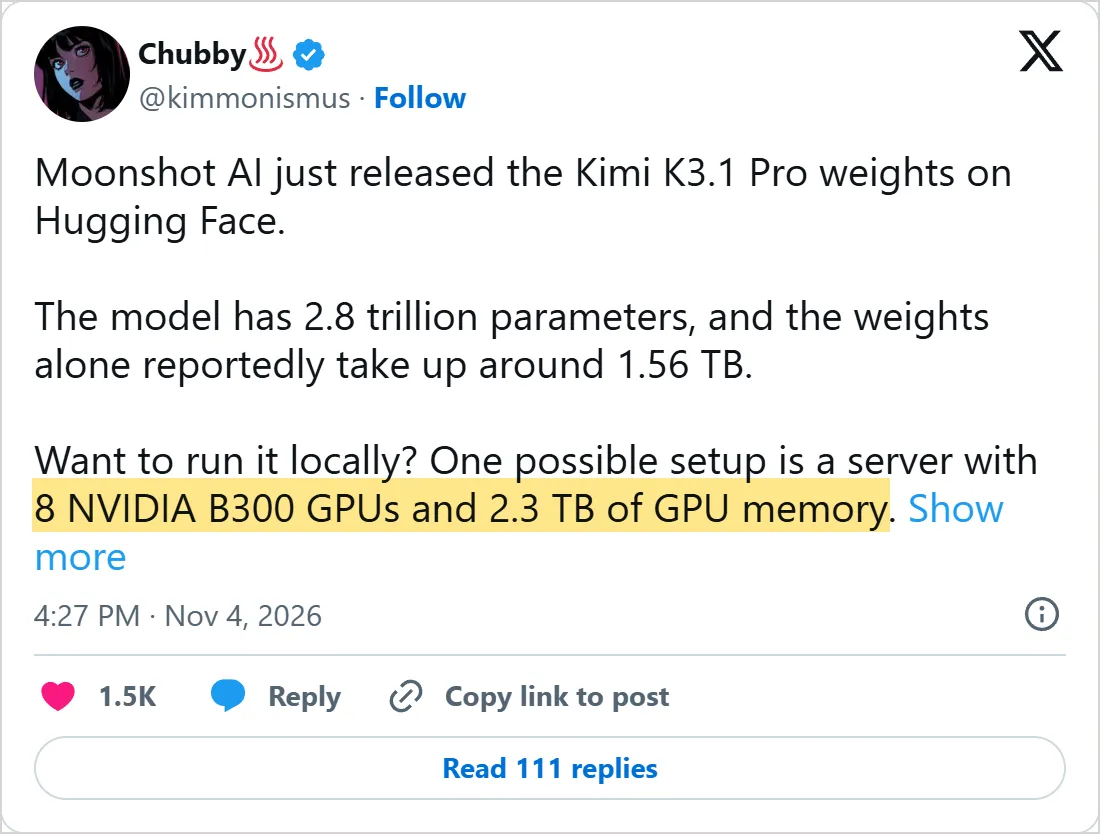
Posted 4 November 2026 at 16:27 UTC, quoting Moonshot's release post. The embed cuts the post at "Show more". Its last line puts the hardware cost at $550,000 to $650,000, Chubby's estimate, not Moonshot's. Source: x.com/kimmonismus/status/2118017354403815899
That 2.3 TB holds the full weights with room left for long contexts. Moonshot's model card recommends vLLM, SGLang or TokenSpeed for serving the weights, all server engines, and names no consumer setup.
Set up Kimi K3.1 Pro in LocModel with the API
LocModel can call Moonshot's API or load a model file from your computer. For the API setup, you'll need a Moonshot key and a project folder:
- Install LocModel 2.1.0. The free app's changelog dates this version to the day of the video. Windows 10 and 11 are the main platform, and there are macOS and Linux builds. The macOS build isn't signed yet, so macOS makes you right-click it and choose Open. On first launch it detects your GPU and downloads a llama.cpp build for NVIDIA, AMD, Intel or plain CPU.
- Create a Kimi API key and top up. Keys come from Kimi's API platform. K3.1 Pro becomes available after a first top-up of at least $1, and your total top-ups set your rate limits.
- Add Kimi as a provider. In the video, Zero Degree opens Settings, adds an API, picks Kimi (Moonshot), pastes the key and fetches the model list.
kimi-k3.1-proappears in it. - Give the agent an empty folder. LocModel's agent mode reads and writes files in a folder you pick and can run Python or PowerShell there. It asks before deleting, moving or touching anything outside that folder.
If the model doesn't show up in step 3, check the key, the model list and the balance in that order. Each answer narrows the cause:
check-kimi-account.sh
# 1. Does the endpoint accept the key? 200 = yes. 401 = a wrong key, or a key
#    from another Kimi product or region (Kimi Code, the China platform)
curl -s -o /dev/null -w "%{http_code}\n" https://api.moonshot.ai/v1/models \
-H "Authorization: Bearer $MOONSHOT_API_KEY"

# 2. After a 200: which Kimi K3 models does this account list?
curl -s https://api.moonshot.ai/v1/models \
-H "Authorization: Bearer $MOONSHOT_API_KEY" | grep -o '"id": *"kimi-k3[^"]*"'

# 3. What can it spend, in USD? At 0 or below, inference calls fail
curl -s https://api.moonshot.ai/v1/users/me/balance \
-H "Authorization: Bearer $MOONSHOT_API_KEY" | grep -o '"available_balance": *[-0-9.]*'
A 200, no kimi-k3.1-pro line and a zero balance point to the missing first top-up rather than the key. A 401 points to the key itself. Moonshot's troubleshooting page says keys from Kimi Code or another regional platform don't work on this endpoint.
The same API works from your own scripts, because Moonshot's API speaks OpenAI's format. Older Kimi guides, and the code in many tutorials, get three things wrong for this model. The address for international accounts is api.moonshot.ai, while api.moonshot.cn belongs to the China platform. Thinking can't be switched off on K3.1 Pro: reasoning_effort turns it down to low or up to high or max, the default. And leave temperature out. Moonshot's parameter table fixes it at 1.0 for the K3 series, and any other value, such as the 0.3 some tutorials pass, returns an error.
kimi_turbofan.py
import os, re
from openai import OpenAI

client = OpenAI(
  api_key=os.environ["MOONSHOT_API_KEY"],
  base_url="https://api.moonshot.ai/v1",
  timeout=900,  # max effort can think for minutes before it answers
)

resp = client.chat.completions.create(
  model="kimi-k3.1-pro",
  reasoning_effort="high",  # low, high or max (default)
  messages=[
      {"role": "system", "content": "Reply with one self-contained HTML file that loads Three.js from a CDN. No explanation."},
      {"role": "user", "content": "Build an interactive 3D turbofan engine with an exploded-view slider."},
  ],
)

html = resp.choices[0].message.content.strip()
html = re.sub(r"^```(?:html)?\s*|\s*```$", "", html)  # drop a Markdown fence if the model adds one
with open("turbofan_3d.html", "w", encoding="utf-8") as f:
  f.write(html)
print(resp.usage)  # reasoning tokens are billed too
The script follows Moonshot's quickstart. We haven't run it against the API, so treat it as untested and the prompt as a starting point. One rule from the quickstart matters once you go past a single call: in a multi-turn chat or a tool loop, send back the whole assistant message with its reasoning_content and tool_calls, rather than content alone.
What K3.1 Pro built through the API
Two of the video's five API builds show what LocModel adds to the model. For the first-person shooter, the presenter bound a local folder and allowed tool use. The model then wrote a whole 3D project with terrain and enemy waves straight into that folder, so the result was files on disk, ready to open, rather than code in a chat window. The turbofan engine is the other kind of output: one Three.js page with fan blades, compressor, combustion chamber and turbine. You can rotate it or pull it apart, and it's the same kind of page the script above asks for.
That matches what Moonshot says it trained for. Its tech blog names 3D creation and Three.js scenes as targets. It reports 92.7% on BenchCAD with tools, a test of rebuilding 3D objects as CAD code, against 96.2% for Claude Opus 5.5 and 95.9% for GPT-6 Astra. Those are Moonshot's runs.
On version 5 of the Artificial Analysis Intelligence Index, K3.1 Pro scored 46 and Claude Opus 5.5 scored 58. K3.1 Pro led the open-weight models in that comparison. At launch, on the older version 4, it placed fourth with 55, the number most early coverage repeats.
The video turned thinking on for one build and got finer geometry and lighting at a higher token cost. On the API, K3.1 Pro is a reasoning model that always thinks first, and reasoning_effort only sets how long. At the default max, Artificial Analysis measured 153 seconds before the first word of the answer on its test tasks. Moonshot describes the setting as a trade between depth, latency and token use, so low is the one for a quick edit to a file the agent already wrote.
What the API costs, worked through
Moonshot charges $2 per million input tokens and $10 per million output tokens, and cached input costs $0.20, according to Artificial Analysis's launch note. Moonshot counts reasoning tokens toward usage, and they share the output budget set by max_tokens. Batch jobs that can wait cost 60% of the standard rate.
A worked example at those rates: a request with 10,000 uncached input tokens and 5,000 billed output tokens costs about $0.07. If the model also spends 20,000 reasoning tokens and they bill at the output rate, the total rises to about $0.27. In that example the thinking costs more than the answer.
Artificial Analysis spent $3.68 per task running its index on K3.1 Pro at max effort. Claude Opus 5.5 cost $10.04 per task on the same index, so the open model costs about a third as much for a lower score. At $3.68 a task, Chubby's $550,000 low estimate for a server pays for roughly 150,000 index-sized jobs before power or cooling. Our LLM cost calculator turns your own monthly token volumes into a bill at these rates.
Moonshot's own platform isn't the only door. OpenRouter listed 21 endpoints for K3.1 Pro at our check. Eight of them, including Moonshot, Together, Fireworks and Nebius, charged Moonshot's rate, and a few charged less. That helps if paying Moonshot directly is awkward from your country.
What leaves your computer, and what LocModel doesn't say
LocModel's site says prompts, reference images and generated media never leave your machine, and that it needs no account. That describes local models. When you select Moonshot as the provider, prompts go to its API. File contents can also leave your computer if LocModel includes them in a request. Start with an empty project folder and add only the files the task needs.
A 30B-class model that fits your GPU can take the private files at a usable speed. LocModel's own page shows Muse Glimmer 30B at 38 tokens per second in 17 GB. K3.1 Pro through the API then takes the 3D and code builds where the files aren't sensitive.
LocModel's site names no company behind it, only a copyright line and a contact form. It doesn't say whether the code is open, and its macOS build isn't signed. Unsloth makes an open-source desktop app, Unsloth Studio, that also offloads to RAM automatically and runs on Windows, macOS and Linux. It loads the same files, so the speed limits above apply to it too.
More from Mindber
- Gemini 4 Carbon vs Opus 5.5 and GPT-6: the closed models K3.1 Pro is measured against, with cost per task for each.
- The best AI models, June 2026: the leaderboard before the Kimi K3 release.
- What open-source AI means, the difference behind Moonshot's custom license.
- The DeepSeek and Claude directory pages, and the open-source AI models, AI models and AI code assistant categories, list other models to weigh against Kimi.
Frequently asked questions
Is Kimi K3.1 Pro free?
Moonshot makes the original K3.1 Pro weights available for download under its model license. The release is about 1.56 TB on disk. The roughly 600 GB figure above refers to Unsloth's 1-bit build of the earlier Kimi K3. API access is billed separately: it opens after a $1 top-up, and Moonshot adds a $5 voucher once your top-ups reach $5.
What is the difference between Kimi K3 and Kimi K3.1 Pro?
K3.1 Pro is K3 with much more post-training, mostly large-scale reinforcement learning, plus different attention layers. Both have a 1,048,576-token context window. On Moonshot's internal long-horizon coding test, Kimi Code Bench 3.0, it scores 61.2% against K3's 55.95%. On Moonshot's internal stress test for facts, its claim-level hallucination rate fell from 23.4% to 8.3%.
Is Kimi K3.1 Pro better than Claude Opus 5.5?
For coding agents it comes close on Moonshot's own numbers: 65.7% on Terminal-Bench 4.0 against 66.4% for Opus 5.5. Moonshot ran its model in Claude Code and took the Opus figure from published results. Independent testing puts Opus clearly ahead on the broad index. K3.1 Pro's edge is that you can download it and pay less for each task.
Can I use Kimi K3.1 Pro commercially?
Yes, under conditions that only bite at scale. A model-as-a-service business with more than $20 million in revenue over 12 months needs a separate agreement with Moonshot. A product with more than 100 million monthly users or $20 million in monthly revenue must show "Kimi K3.1-Pro" in its interface. Internal use is exempt from both, which is what an open-weight model license like this usually allows.
Will there be a Kimi K3.1 Pro GGUF for LocModel and llama.cpp?
Probably, but not on the day of our check. Unsloth's K3.1 Pro mirror is already up, and its Kimi K3 GGUFs went up on 27 July, the day that model's weights came out. The new Gated DSA attention layers mean a GGUF needs a llama.cpp build that supports them, so update LocModel's engine before you import one.
How we assessed this: On 5 November 2026 we read Moonshot's model card, tech blog, API quickstart, parameter table, troubleshooting page and license, Unsloth's Kimi K3 guide and LocModel's site. We pulled the file lists of every Kimi repo involved through Hugging Face's API at 15:45 UTC. The local test is the one the Chinese channel 零度解说 (Zero Degree) posted on YouTube that day. Its steps and speeds are the channel's, and we did not repeat them. Artificial Analysis, OpenRouter, a Hacker News thread and two posts on X filled in the rest. Mindber did not run Kimi K3.1 Pro, so this is analysis of public sources, not hands-on testing. The Kimi logo on the cover comes from the open-source Lobe Icons set and belongs to Moonshot AI. On 6 November we reordered the post around the model identification, labelled each speed by model, setup and source, and narrowed the privacy section to what LocModel's site states.
Sources & methodology
Editorial analysis of Moonshot AI's model card, tech blog, API docs and license, Unsloth's guide and Hugging Face file lists, LocModel's site, Zero Degree's video, Artificial Analysis, OpenRouter, Tom's Hardware, a Hacker News thread and posts on X, read on 5 November 2026. Mindber did not run Kimi K3.1 Pro or LocModel.
- [1]2.8T total and 104B active parameters; 93 layers; 69 KDA + 24 Gated DSA layers replacing K3's Gated MLA; 896 experts, 16 selected, 2 shared; 1,048,576 context; MXFP4 weights; Terminal-Bench 4.0 65.7% vs Opus 5.5 66.4%; vLLM, SGLang and TokenSpeed recommendedhttps://huggingface.co/moonshotai/Kimi-K3.1-Pro
- [2]Repo created 2 November, public and ungated, 1,561,355,732,732 bytes stored; architecture kimi_k31Hugging Face API: moonshotai/Kimi-K3.1-Pro · 2026-11-05https://huggingface.co/api/models/moonshotai/Kimi-K3.1-Pro
- [3]Use, modify and sell; $20M model-as-a-service agreement; 100M users or $20M monthly revenue display rule; internal use exemptKimi K3.1-Pro License · 2026-11-05https://huggingface.co/moonshotai/Kimi-K3.1-Pro/blob/main/LICENSE
- [4]3D creation and Three.js targets; BenchCAD 92.7% with tools vs Opus 5.5 96.2% and GPT-6 Astra 95.9%; weights promised by 4 NovemberKimi K3.1 Pro tech blog · 2026-10-23https://www.kimi.ai/blog/kimi-k3-1-pro
- [5]api.moonshot.ai/v1 base URL; kimi-k3.1-pro model ID; post-trained from K3 with more RL compute; Kimi Code Bench 3.0 Long-horizon 61.2% vs K3 55.95%; Kimi Hallu Bench Hard 23.4% to 8.3%; thinking always on; reasoning_effort low, high or max (default); $1 minimum top-up; return the whole assistant message in multi-turn useKimi API Platform: K3.1 Pro quickstart · 2026-11-05https://platform.kimi.ai/docs/guide/kimi-k3-1-pro-quickstart
- [6]K3 series, K3.1 Pro included: temperature fixed at 1.0 and top_p at 0.95, other values return an error; reasoning_effort default maxKimi API Platform: model parameter reference · 2026-11-05https://platform.kimi.ai/docs/api/models-overview
- [7]reasoning_content counts toward token use; reasoning effort trades depth, latency and token usehttps://platform.kimi.ai/docs/guide/use-thinking-models
- [8]401 for a key from another Kimi product or regional platform; balance endpoint; inference fails at an available balance of 0 or lessKimi API Platform: Troubleshooting and Balance API · 2026-11-06https://platform.kimi.ai/docs/guide/troubleshooting
- [9]Batch inference at 60% of the standard price; $5 voucher at $5 cumulative top-up; models endpointhttps://platform.kimi.ai/docs/pricing/chat
- [10]Release post: weights on Hugging Face, posted 16:00 UTCKimi.ai (@Kimi_Moonshot) on X · 2026-11-04https://x.com/Kimi_Moonshot/status/2118010528123773297
- [11]8 B300 GPUs, 2.3 TB of GPU memory, $550,000 to $650,000 estimate; posted 16:27 UTCChubby (@kimmonismus) on X · 2026-11-04https://x.com/kimmonismus/status/2118017354403815899
- [12]1-bit build 594 GB with 78.9% top-1 agreement; RAM + VRAM needs of 610 GB to 1.6 TB; about 20 tokens/s on B200s when it fits; disk offloading still works, much slower; Unsloth Studio offloads to RAMUnsloth: Kimi K3, How to Run Locally · 2026-11-05https://unsloth.ai/docs/models/kimi-k3
- [13]UD-IQ1_S in 14 files, 594.0 GB; sizes and file counts of every buildHugging Face API: unsloth/Kimi-K3-GGUF · 2026-11-05https://huggingface.co/unsloth/Kimi-K3-GGUF
- [14]K3.1 Pro mirror created 4 November with 96 safetensors files and no GGUF; no K3.1 Pro GGUF in Hugging Face or ModelScope search at 15:45 UTChttps://huggingface.co/unsloth/Kimi-K3.1-Pro
- [15]Video posted 5 November 2026 at 12:28 UTC, 10:59 long; 14-file 1-bit build on a 1 TB SSD; about 0.1 tokens/s locally; above 14 tokens/s on the API; five 3D builds零度解说 (Zero Degree) on YouTube · 2026-11-05https://www.youtube.com/watch?v=2wnFmecg6-8
- [16]Version 2.1.0 dated 5 November; free; Windows main platform, unsigned macOS build, Linux zip; llama.cpp engine for NVIDIA, AMD, Intel and CPU; GPU, RAM and disk layering; agent folder rules; local-only privacy claims; Muse Glimmer 30B at 38 tokens/s in 17 GB; no company namedLocModel site and changelog · 2026-11-05https://locmodel.com
- [17]Intelligence Index v5.0.1 score 46; 33 tokens/s and 153.54 s to first answer token on Kimi's API; $3.68 per index taskArtificial Analysis: Kimi K3.1 Pro model page · 2026-11-05https://artificialanalysis.ai/models/kimi-k3-1-pro
- [18]Fourth at launch with 55 on the earlier index; $2 / $10 / $0.20 per million input, output and cached tokensArtificial Analysis: Kimi K3.1 Pro launch note · 2026-10-23https://artificialanalysis.ai/articles/kimi-k3-1-pro-launch-benchmarks
- [19]Index v5 released 27 October; 46 is the highest of any open-weight modelLet's Data Science, citing Gizmodo · 2026-10-29https://letsdatascience.com/news/artificial-analysis-index-v5-drops-kimi-k31-pro-from-fourth-563911c6
- [20]Claude Opus 5.5 at 58 on Index v5.0 and $10.04 per index taskArtificial Analysis leaderboard · 2026-10-30https://artificialanalysis.ai/leaderboards/models
- [21]21 endpoints for K3.1 Pro; eight, including Moonshot, Together, Fireworks and Nebius, at $2 / $10OpenRouter API: K3.1 Pro endpoints · 2026-11-05https://openrouter.ai/moonshotai/kimi-k3.1-pro
- [22]Samsung 9100 Pro rated up to 14,800 MB/s sequential readsTom's Hardware: Samsung 9100 Pro review · 2026-11-05https://www.tomshardware.com/pc-components/ssds/samsung-9100-pro-ssd-review
- [23]About 25 GB read from SSD per token and about 0.3 tokens/s in a demo on a 128 GB M5 MacBook Pro (comment 50369725); usefulness from 7 to 10 tokens/s (50371636); unattended parallel jobs (50371850); several drives in parallel (50377416)Hacker News: Kimi K3.1 Pro model weights are out · 2026-11-04https://news.ycombinator.com/item?id=50366999
Keep reading
Gemini 4 Carbon: Google's New #1 Model, Compared With Opus 5.5 and GPT-6
The closed models at the top of the index, with cost per task.
AI Model Rankings History: Every #1, GPT-3 to Gemini 4
Who held the top spot, month by month, and for how long.
The True Cost of AI Tools in 2026
What teams pay beyond the sticker price.
Learn the basics on Mindber
Background for this article, from the free Mindber learning hub.
Topic guides
AI Basics lessons
Share this article
Legal notice
This publication constitutes editorial commentary on publicly available information and does not constitute financial, legal, investment, or professional advice. Product names, trademarks, and registered trademarks referenced herein are the property of their respective owners; their appearance does not imply endorsement or affiliation. Mindber's analysis reflects editorial judgment based on public signals and is subject to change without notice. Scores are not buy, sell, or hold recommendations. No commercial relationship exists between Mindber and the vendors evaluated unless separately disclosed in writing. This publication is governed by the laws of Malaysia. Any dispute arising from or in connection with this publication shall be submitted to the exclusive jurisdiction of the courts of Malaysia.